
Garage›Workbench›Shelf 2
Know where
everything is.
TracStor keeps a list of every bin, box, toolbox and shelf you own, and what's inside each one. Ask for anything and it tells you which bin, and exactly where that bin is.
Free during early access · Android 10 and later · no account needed

TracStor›Why
It's in a box somewhere.
Most of what we own lives out of sight: in totes, toolboxes, closets, garages and storage units. Putting it away is easy. Finding it again is the hard part.
You buy it twice
The extension cord, the 10 mm socket, the spare HDMI cable. It's cheaper to buy another than to open eight boxes, so you do.
Labels say “Misc”
A marker label can't list forty things, and it's wrong the first time something moves. Nobody rewrites it.
Only one person knows
The system lives in someone's head. When they're out, or when you move, it's gone.
TracStor›How it works
Four steps. The last one is the point.
Make a bin
Any container counts: a tote, toolbox, drawer, shelf or cabinet. Give it a name and a place, like Garage › Workbench, and snap a photo of what it looks like.
Label it
Print a QR label on a pocket thermal printer, stick on an NFC tag, or scan a barcode that's already on the box. Each bin also gets a short code like GZ5M7K you can write on tape.
Fill it
Add what's inside by typing, by saying one item at a time, or by taking a photo first and naming it after. New items land at the top so a mistake is one tap away.
Find it
Ask “Where is…?” and get the item, how many you have, the bin, and the bin's full location. Scan any label to open the bin and see everything in it.
TracStor›The real app
Not a mockup. This is TracStor.
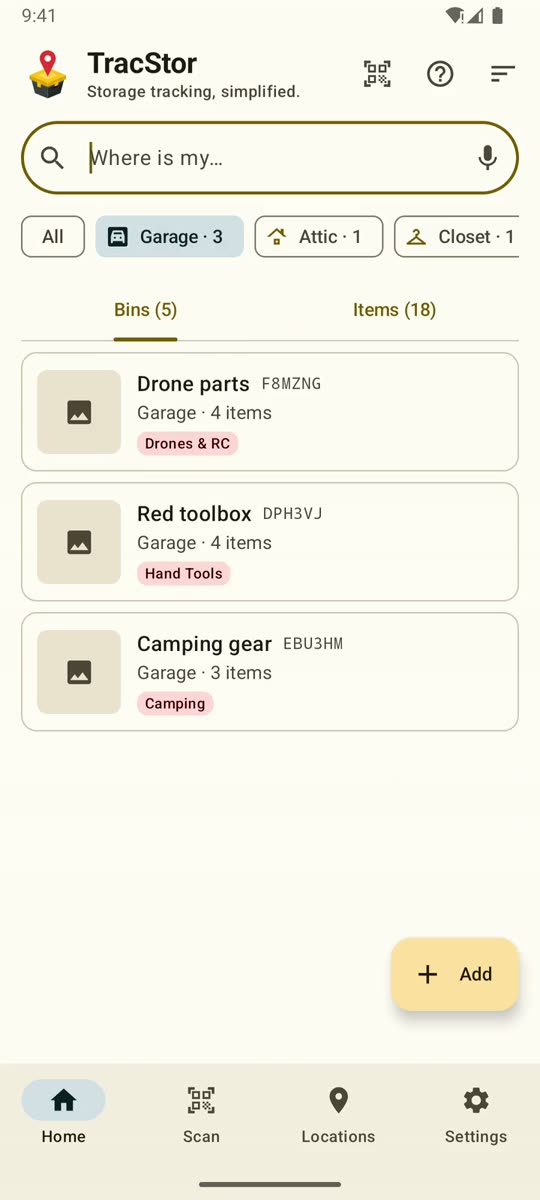
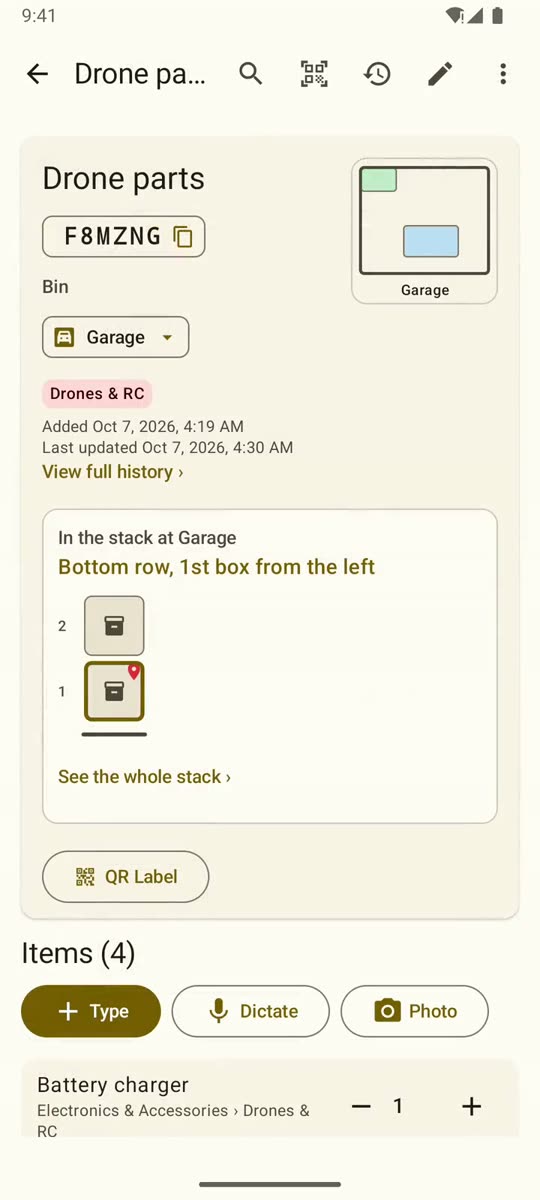
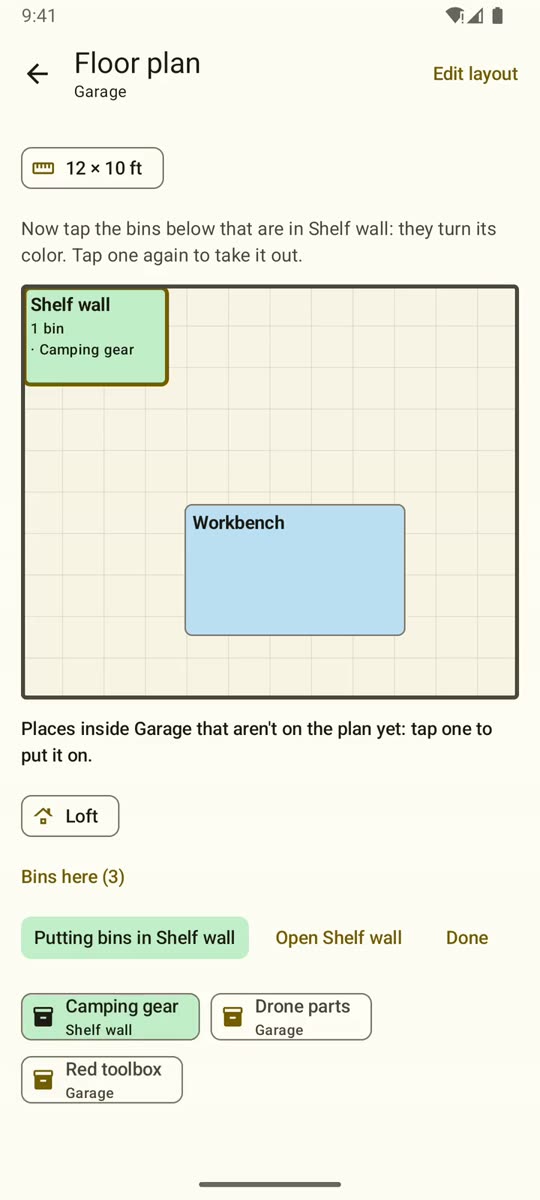
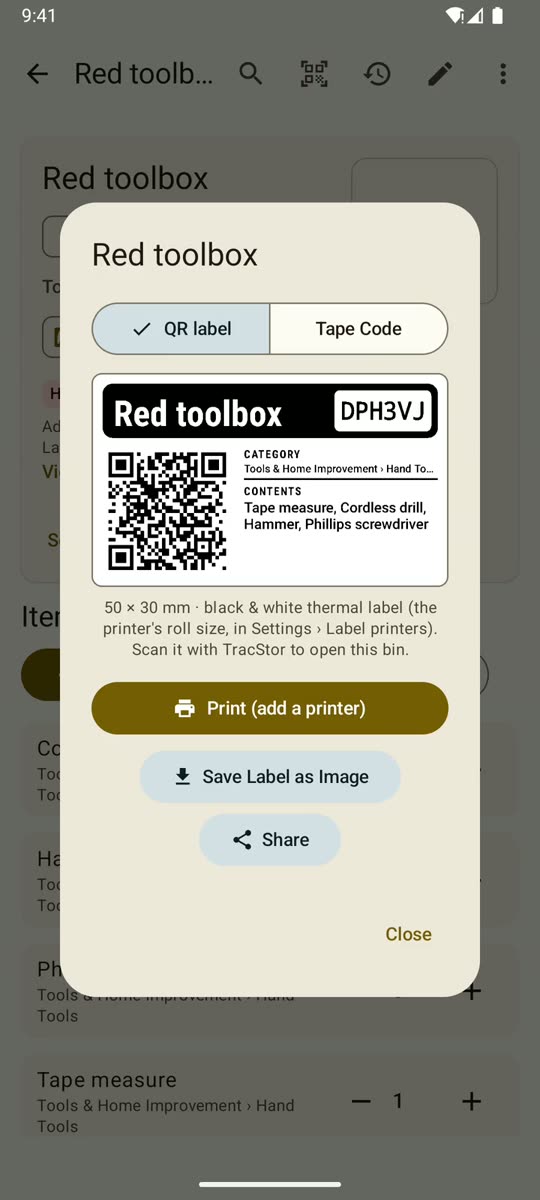
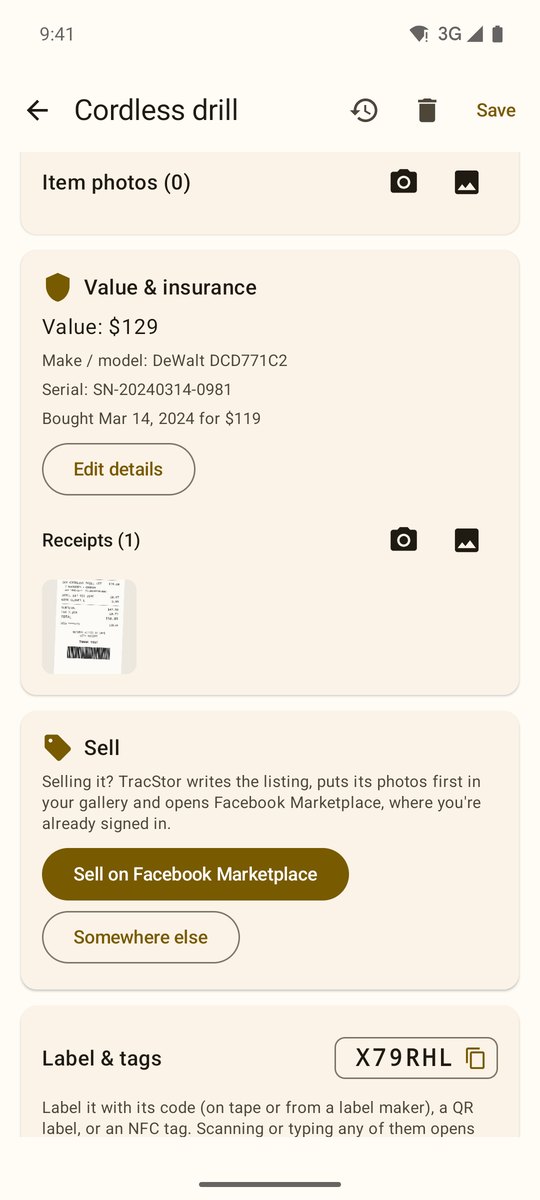
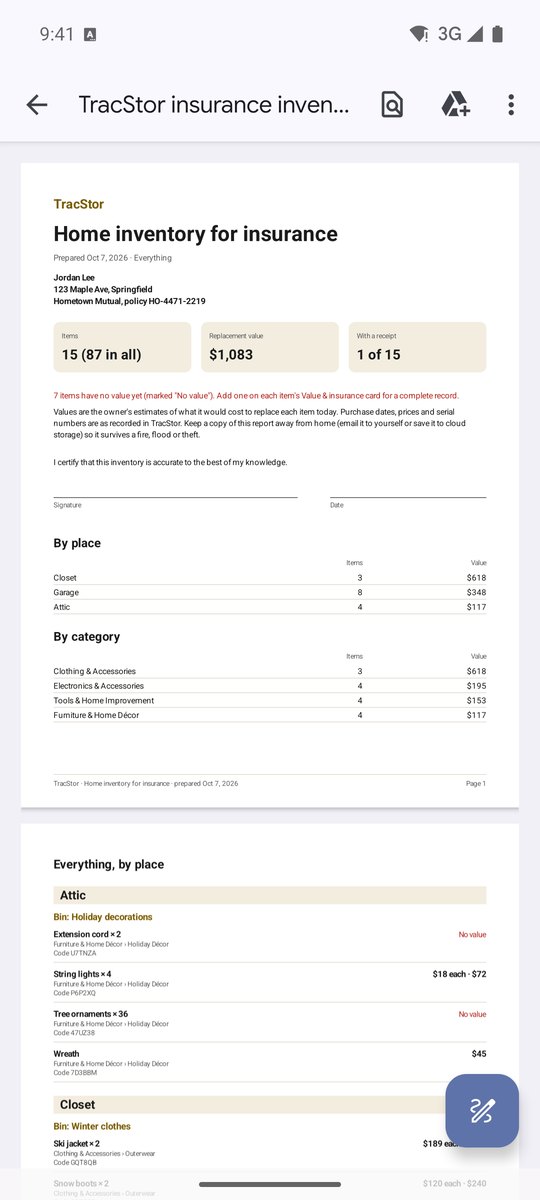
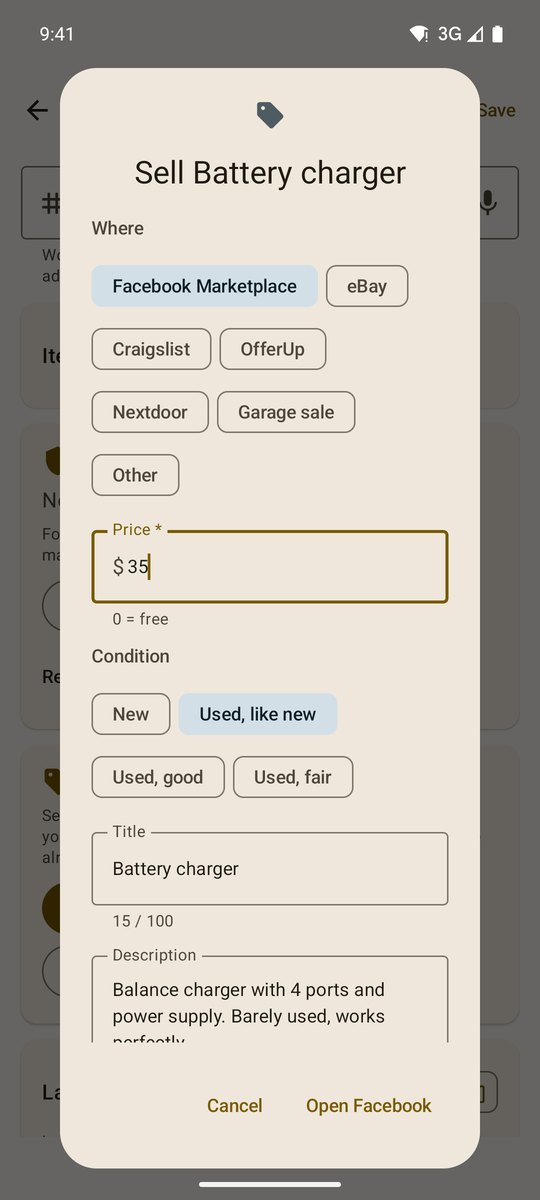
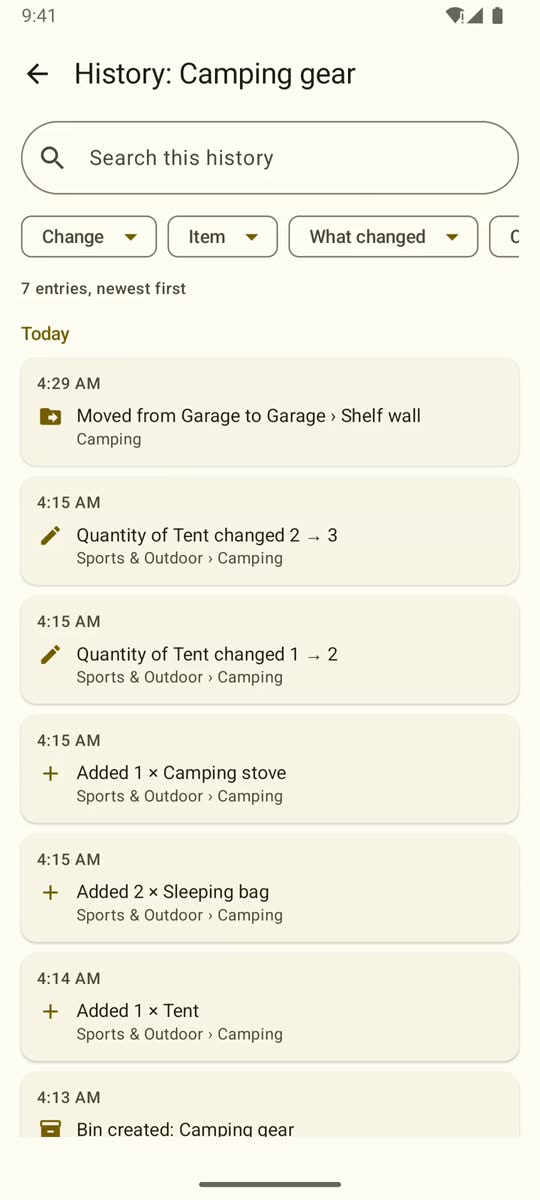
Real screens from the app, version 4.12, with sample data. Swipe through. 40+ updates since October 1, and counting.
TracStor›What it does
Built for real garages,
not demo shelves.
Every feature here was built and tested on a real inventory first: radios, drone parts, battery connectors and a cable bin with dozens of items.
Features›Search
Ask once. Get the shelf.
Search covers item names, bins, categories, keywords and notes. Results show how many you have and where they are, down to the stack and slot. Filter by place, by category or by your own keywords.
- Type or say what you're looking for
- Full location paths, never just “Garage”
- Search inside one bin when you're standing in front of it
Features›Labels & tags
Labels that never go out of date.
A TracStor label carries the bin's name, its code, a QR code and a sample of what's inside. It doesn't print the location, so moving a bin never means reprinting. Scan it with TracStor or the phone's own camera and the bin opens.
- Prints straight to Bluetooth thermal label printers (TSPL), 50 × 30 mm and other sizes
- Writes and reads NFC tags: tap the phone to the box
- Or a printable sheet, a saved image, or the six-character tape code
Features›Floor plans
Draw the room. Drop the bins in.
Sketch a room to scale in feet, block out areas like “Back wall” or “Workbench”, then tap an area and tap bins to put them there. Each area gets its own color, and every bin shows where it sits on the plan.
- Areas are real places: search and labels use them
- Sort bins into areas: tap an area, then tap its bins
- The GPS spot where a bin was entered is kept too, for storage units and second homes
Features›Stacks
Not just the room. The box.
A wall of identical totes is where things go to hide. TracStor remembers each tote's row and position in its stack, and points to it: “2nd row from the floor, 4th box from the left”, with a pin on the exact tote.
- Place a tote with one tap; swap and restack any time
- Moves are logged, and old spots free up by themselves
- Works with floor-plan areas: room, area, stack, box
Features›Voice & photos
Say it, snap it, done.
Standing in front of an open tote with your hands full? Tap the mic and say “XT90 anti-spark connector”. What you say is the item, word for word. Or take the photo first and name it after. Photos go to your phone's Pictures folder, where you can always see them.
- One item per dictation, so nothing gets mangled into a list
- Photos of the bin, of its contents, and of each item
- Item thumbnails right in the bin's list
TracStor›And also
The details that make it stick.
History and undo
Every change is recorded: added, moved, renamed, counted. Deleted things stay recoverable for 30 days.
Loans with reminders
Lent the drill to Mike? Note it and pick a date. TracStor reminds you that morning and opens the item when you tap.
Notes and keywords
Mark a bin “not inventoried yet”. Tag items “camping” or “tax 2025” and filter by them later.
Bins inside bins
A parts box inside a toolbox inside a cabinet. Moving the cabinet moves everything in it.
Backup you control
One ZIP with every bin, item, place and photo, plus spreadsheets that open in Excel. Restore on this phone or a new one.
Works offline
Basements, storage units and cabins often have weak signal. TracStor doesn't need any.
Smart labels
Printed name, code and contents, a QR code, and an NFC tag built in: read it, scan it or tap it. See the labels.
Sell on Facebook Marketplace
TracStor writes the listing, puts the photos first and opens Facebook ready to paste. Then it tracks the sale. How it works.
Insurance report
Values, serial numbers, receipts and photos in one PDF for your insurer, in case of fire, flood or theft. Details.
TracStor›Micro storage Coming soon
Too many bins for the garage? Store a few down the street.
A storage unit is a whole room across town. TracStor micro storage keeps 5 to 25 of your labeled bins in a vetted space a few minutes from home, priced per bin. You see what's in each one from the app and book a pickup when you need it.
TracStor›Your data
An inventory of your home is private. It stays on your phone.
No account to create. No ads. No analytics. TracStor doesn't send your bins, items, photos or places anywhere unless you export them yourself.
- Storage
- A database on your phone; photos in your own Pictures folder.
- Account
- None. Open the app and start.
- Backup
- Your phone's own backup, plus a ZIP you save wherever you like.
- Self-check
- At start-up TracStor repairs broken links between bins, items and places.
TracStor›Who it's for
Anyone with more stuff than shelf space.
Garages & workshops
Fasteners, sockets, chargers, the good tape. Every drawer of the tool chest listed.
Garage › Tool chest › Drawer 3Storage units
Know what's in tote 14 before you drive across town, and which stack it's in.
Unit #214 › Back left › Stack AMoving
Label boxes as you pack, scan them as you unpack. Find the coffee maker on night one.
New house › Kitchen › Box 7Second homes & RVs
The cabin, the boat, the camper. Check what's there before you pack.
Cabin › Shed › Top shelfHobbies
RC parts, sewing notions, LEGO, camera gear. Small things, many bins, exact counts.
Office › Closet › RadiosSeasonal
Holiday decorations, camping kit, pool gear. Out once a year, found in a minute.
Attic › Holiday totes 1–6Insurance
What you own, what it's worth, serial numbers and receipts, in one PDF for your insurer.
Home › Insurance recordSelling
Done with it? List it on Facebook Marketplace in a few taps and track the sale.
Garage › Red toolbox › For saleStores & stockrooms
Counting a whole store? TracStor Count, the business edition, runs physical inventories and posts them to your POS.
Store 101 › Aisle 7 › Bay 3Switching apps?
How TracStor compares with Sortly, Under My Roof, Itemtopia and others, feature by feature.
TracStor › CompareTracStor›For business In the pilot
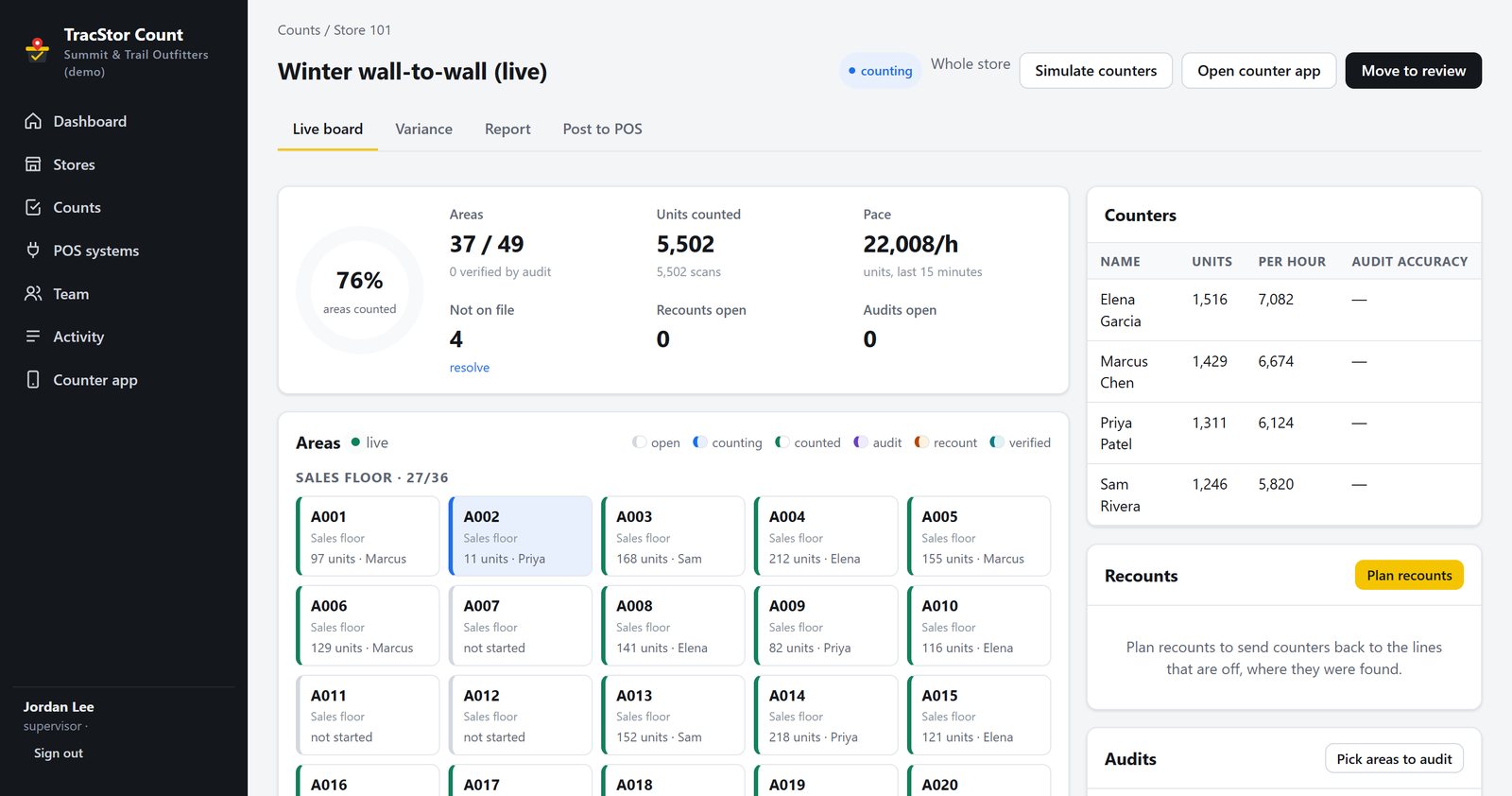
Running a store? Meet TracStor Count.
The business edition of TracStor counts a whole store with your own team: the item file from your POS in, counters on phones and handhelds, a live board for supervisors, recounts of only what's off, a report the moment counting stops, and the counts posted back to Square, Shopify, Clover, Lightspeed or any system by file. RAIN RFID ready.
TracStor›FAQ
Questions
What can I run TracStor on?
Android 10 or later, on a phone with NFC and a camera, which is most phones sold since 2019. The iPhone version is coming, with the same needs. Check yours on the supported phones page.
Do I need a label printer?
No. You can print a sheet of labels on any printer, save a label as an image, write the bin's six-character code on tape, or use NFC stickers. A Bluetooth thermal label printer makes it fastest: TracStor prints directly to TSPL printers such as the Clabel CT221B (about $22), with no other app needed. See hardware and costs, or buy the hardware that works.
What happens when I move a bin?
Change its location in the app, or tap it onto an area of a floor plan. The label stays the same because it never printed the location. Anything inside the bin moves with it, including bins inside bins.
Can my family use it too?
Today, a TracStor inventory lives on one device. Sharing an inventory with family through a Google Drive folder you both open is the next big feature, with changes syncing both ways and working offline.
Is it useful for an insurance inventory?
Yes: that's built in. Record each item's value, make, model, serial number and purchase details, photograph receipts, and TracStor makes one PDF report with totals, every item by place and bin, and the receipts. See a real report.
What if I lose my phone?
Your phone's automatic backup keeps TracStor's database in your account. For a complete copy including photos, use Settings › Backup & export and save the ZIP to Google Drive or a computer. Restoring on a new phone puts everything back.
How is TracStor different from Sortly or a spreadsheet?
A spreadsheet doesn't know where anything is. TracStor knows the place, the bin and even the box's spot in a stack, prints labels straight to a $25 Bluetooth printer, writes NFC tags, works offline with no account, and makes an insurance report. Here's a sourced comparison with eight apps.
Can I sell things from TracStor?
Yes. On any item, tap Sell on Facebook Marketplace: TracStor writes the listing, puts the photos first in your gallery and opens Facebook ready to paste. You publish it there, and TracStor tracks the sale. How it works.
How much does it cost?
TracStor is free during early access. We'll announce pricing before early access ends, and anything you've already entered stays yours either way: you can always export it.
Get early access
TracStor is in early access. Leave your email and we'll send an invite with the download link and a short setup guide.